
Table of Contents
- What Makes a Great All in One Wedding Organizer?
- The Best All in One Wedding Organizer Options Compared
- Using a Wedding Planning Checklist Template to Stay on Track
- How a Wedding Budget Tracker Spreadsheet Keeps Costs Under Control
- Wedding Guest List Management Tools: RSVP, Seating, and More
- Building Your Wedding Timeline Creator and Day-Of Itinerary
- Which Wedding Organizer Should You Choose?
- Conclusion
Last Updated: August 5, 2026
Finding the best all in one wedding organizer is one of the first decisions engaged couples make, and it shapes every planning decision that follows. The right organizer eliminates fragmentation, no more guest lists in Google Sheets, budgets in Excel, seating charts on paper, and vendor emails scattered across inboxes. Below, we compare the leading options so you can choose the one that fits how you work.
Quick Picks:
- Best Overall: Ever After Suite Digital Wedding Planner, one-time purchase, 16 connected sections, no app or Excel required
- Best Free Platform: Joy, free wedding website, guest management, and RSVP tracking
- Best for Professional-Level Detail: Aisle Planner, subscription-based, built for planners and detail-obsessed couples
- Best for Guest Communication: Appy Couple, stylish website plus mobile app for guest engagement
- Best DIY Option: Google Sheets / Excel, maximum flexibility, zero structure out of the box
What Makes a Great All in One Wedding Organizer?
A great all in one wedding organizer connects every planning category, budget tracking, guest list management, vendor coordination, and day-of timelines, so nothing slips through the cracks. A genuine all-in-one solution propagates changes across sections automatically, or at minimum keeps everything in one place so you always know where to look.

Essential Features to Look For
A wedding organizer worth using in 2026 should cover:
- Budget tracker with itemized categories, deposit tracking, and payment schedule
- Guest list management with RSVP tracking, meal preferences, and plus-one status
- Seating chart connected directly to the guest list
- Vendor contact manager with contract storage and communication notes
- Wedding timeline creator for planning phase and wedding day itinerary
- Checklist system with milestone tracking by month
- Wedding party management for duties, attire, and contact details
- Mobile access or cloud-based storage for real-time partner updates
Missing even two of these forces you to reach for a second tool, eliminating the all-in-one advantage.
Digital vs. Physical Wedding Planners: Which Works Better?
Digital wins for most couples. A physical binder cannot update automatically, cannot be shared across devices, and cannot send reminders. The smartest approach is a digital system for planning, with a printed day-of binder as the final output.

The Best All in One Wedding Organizer Options Compared
| Organizer | Price | Best For | Key Strength | Offline Access |
|---|---|---|---|---|
| Ever After Suite | $21.99 one-time | Couples who want everything in one download | 16 connected sections, no app needed | Yes |
| Joy | Free | Couples prioritizing guest communication | Free RSVP tracking and wedding website | No (app-based) |
| Aisle Planner | $39/month | Detail-obsessed couples or pro planners | Deep project management tools | Limited |
| Appy Couple | $99/year | Design-focused guest engagement | Matching website and mobile app | Limited |
| Google Sheets / Excel | Free | DIY couples comfortable with spreadsheets | Maximum customization | Yes (local files) |
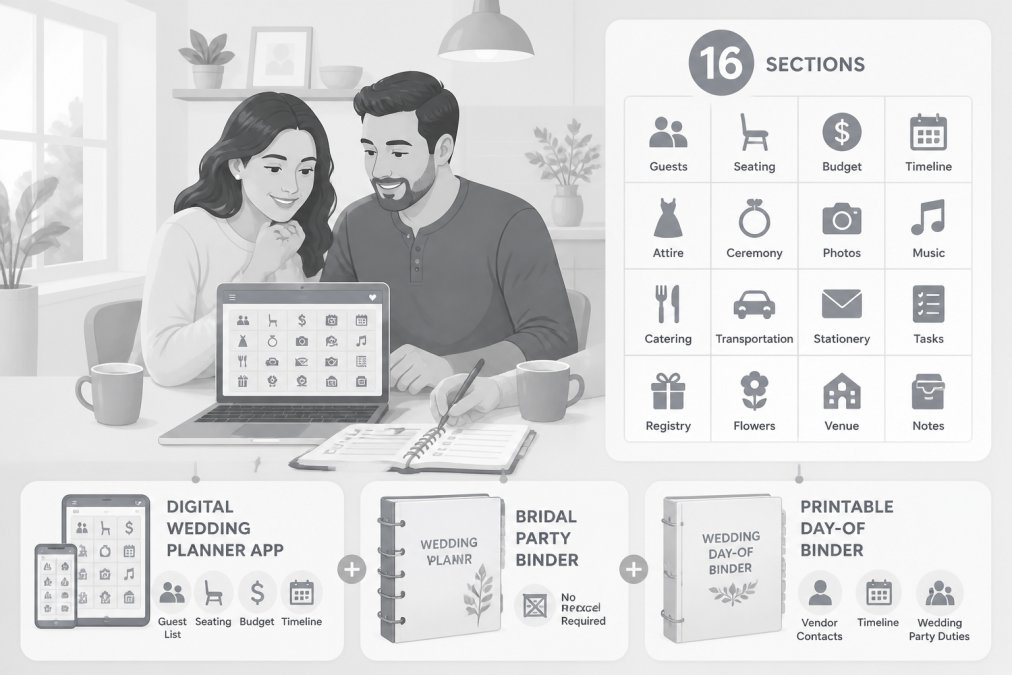
1. Ever After Suite Digital Wedding Planner ($21.99)
Our top pick. Ever After Suite is the best all in one wedding organizer for couples who want a complete, structured system without monthly subscriptions or app dependencies.
The core product is a single downloadable file that runs in your browser. No app installation. No Excel formulas to build. No ongoing fees. You pay $21.99 once and own it.
What separates it from generic templates is the 16 interconnected sections. Your guest list connects to your seating chart. Your vendor contacts live alongside your payment schedule. Everything talks to everything else, which is exactly what "all in one" should mean. The Ever After Suite also ships with a printable wedding day-of binder covering vendor contacts, timeline, and wedding party duties.
What works: One-time price, instant download, offline-compatible, no app required, works on any device with a browser.
One honest limitation: Real-time synchronization between two devices requires sharing the file through Google Drive or Dropbox.
2. Joy (Free Wedding Platform)
Joy bundles a customizable wedding website, guest list manager, RSVP tracking, digital invitations, and registry into one free account. Joy tracks meal choices, custom questions, and RSVP status with a user-friendly interface. Guests can upload photos and videos directly to a shared gallery.
What works: Completely free core features, strong RSVP tracking, wedding website builder included, clean mobile experience.
Where it falls short: Custom domain names cost extra. Planning tools are lighter than dedicated software. Vendor management and budget tracking lack depth.
3. Aisle Planner ($39/month)
Aisle Planner is professional-grade wedding planning software built for wedding planners managing multiple clients. Its project management tools are comprehensive: checklists, timelines, budgets, vendor managers, seating layout tools, and client portals. At $39/month billed annually, you're paying for professional infrastructure many couples don't need.
What works: Deep project management, excellent vendor communication tools, strong collaboration features.
Where it falls short: Subscription cost adds up over 12-18 months. More tool than most couples require.
4. Appy Couple ($99/year)
Appy Couple leads on design, offering hundreds of boutique website templates with matching mobile app designs. Guest list management includes personalized event itineraries, useful for multi-day or destination weddings. Collaborative photo sharing lets guests upload pictures during and after the wedding.
The friction point: guests need to download the Appy Couple app to access full features. For weddings with older guests or those less comfortable with apps, that creates a barrier.
What works: Beautiful, cohesive design across all touchpoints, strong guest engagement features, solid photo sharing.
Where it falls short: App download requirement for guests, custom domains cost extra, planning depth is lighter than Aisle Planner or Ever After Suite.
5. Google Sheets / Excel (Free)
Google Sheets offers maximum control and zero cost. Real-time collaboration allows both partners to edit simultaneously. The flexibility is genuine, you build exactly what you need.
The problem is setup cost. Building a functional wedding planning system from scratch takes significant time, and most couples abandon the system after weeks of maintenance.
What works: Free, highly customizable, real-time collaboration, works on any device.
Where it falls short: No built-in structure, requires manual setup and ongoing maintenance, no wedding-specific features like vendor management or seating chart tools.
Using a Wedding Planning Checklist Template to Stay on Track
A wedding planning checklist template is a month-by-month breakdown of every task from engagement to honeymoon. The most effective checklists are milestone-based rather than date-based. Instead of "do X by March 15," they say "do X 12 months before the wedding."
A practical checklist should cover:
- 12+ months out: venue booking, budget setting, initial guest list
- 9-12 months: photographer, caterer, officiant, florist contracts
- 6-9 months: save-the-dates, attire shopping, honeymoon booking
- 3-6 months: invitations, seating chart finalization, menu selection
- 1-3 months: final vendor confirmations, wedding day itinerary, rehearsal dinner
- Final weeks: payment completion, printable day-of binder preparation
A checklist without a connected budget tracker is only half a system. Every task involving a vendor or purchase should link to a line item in your budget.
How a Wedding Budget Tracker Spreadsheet Keeps Costs Under Control
A wedding budget tracker spreadsheet is the single most important financial tool in your planning system. An effective tracker should include:
- Category breakdown: venue, catering, photography, florals, music, attire, stationery, transportation, accommodations, miscellaneous
- Per-vendor tracking: contract total, deposit paid, next payment due date, final balance
- Running total: committed spend vs. remaining budget
- Buffer line: a dedicated contingency reserve (5-10% of total budget)
The payment schedule column is the piece most templates omit. Map every payment to a calendar date and review it monthly. For couples who want this structure without building it themselves, the Ever After Suite digital wedding planner includes an integrated budget tracker alongside all 16 planning sections.
Wedding Guest List Management Tools: RSVP, Seating, and More
Managing a wedding guest list requires RSVP tracking, meal preference collection, plus-one management, address collection, and a seating chart that updates as RSVPs come in.
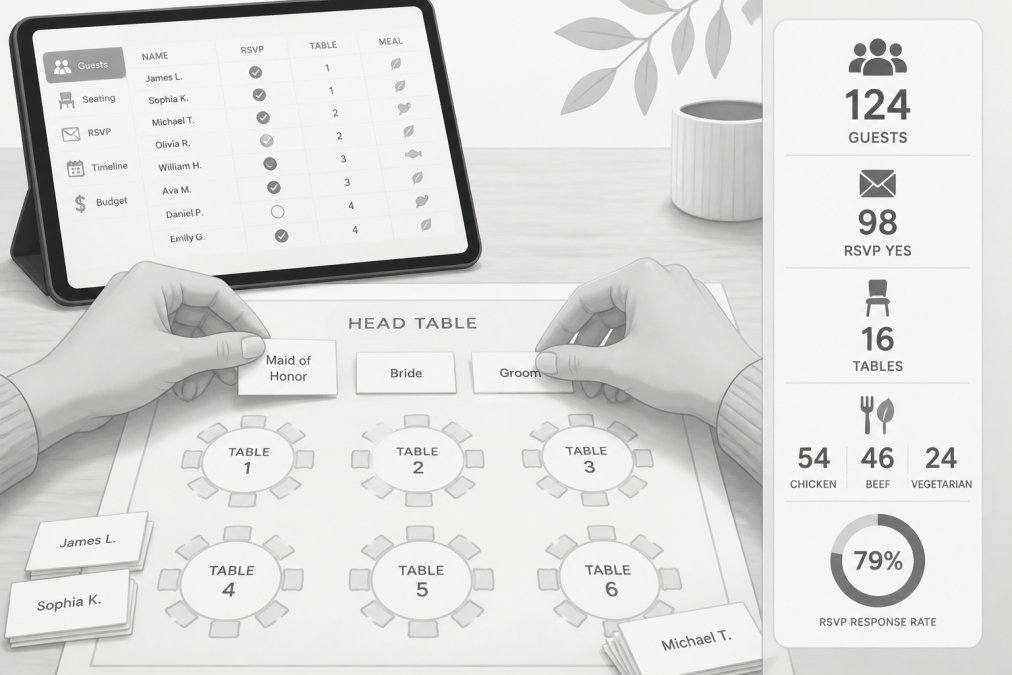
The seating chart is where guest list management gets genuinely difficult. For a 200-person wedding with complex family dynamics, you need a system that lets you see the full guest list, filter by table, and move guests without losing track of dietary restrictions or family groupings.
The key feature to look for is a seating chart that pulls directly from your guest list rather than requiring duplicate data entry. Any system requiring duplicate entry will develop inconsistencies within weeks.
Practical guest list management checklist:
- Create initial list with full names and contact information
- Assign each guest a household/group for invitation addressing
- Track RSVP status (invited, sent, responded yes, responded no, pending)
- Collect meal preferences and dietary restrictions with RSVPs
- Note plus-one status and whether plus-ones have responded
- Build seating chart only after final RSVP deadline passes
- Export final guest count to caterer in the format they require
Locking your guest list at least three weeks before the wedding and communicating a firm final count to all vendors prevents day-of discrepancies.
Building Your Wedding Timeline Creator and Day-Of Itinerary
A wedding timeline creator serves two distinct purposes: the planning timeline covers 12-18 months of preparation; the wedding day itinerary is a minute-by-minute schedule for the day itself.
For the wedding day itinerary, detail matters. A timeline that says "ceremony: 4:00 PM" is not useful to a photographer. A timeline that says "4:00 PM ceremony begins, 4:30 PM ceremony ends, 4:35 PM wedding party exits for portraits, 5:15 PM cocktail hour begins" is actually useful.
Key elements of a functional wedding day itinerary:
- Hair and makeup start time (work backward from ceremony, allow buffer)
- Getting-ready photo coverage start time
- First look time (if applicable)
- Wedding party portrait block
- Ceremony start and end
- Cocktail hour start and end
- Reception entrance time
- First dance, parent dances, toasts with allocated times
- Dinner service window
- Cake cutting
- Last dance and send-off
- Vendor end times
Share this document with every vendor at least two weeks before the wedding.
Which Wedding Organizer Should You Choose?
The right choice depends on how much structure you need, whether you prefer a one-time purchase or subscription, and how important guest communication is relative to planning depth.
For most couples planning without a professional wedding planner, Ever After Suite is the strongest all-in-one option. The 16 connected sections cover every planning category in a single download, the one-time price eliminates ongoing costs, and the offline-compatible browser format means both partners can access it without app dependencies.
If guest communication and a wedding website are your primary needs, Joy's free platform covers those bases well. For couples working with a professional planner needing client collaboration tools, Aisle Planner's subscription cost is justified.
Data Privacy, Offline Access, and Accessibility Considerations
Data privacy is an underappreciated factor in choosing a wedding organizer. Cloud-based platforms store your guest list, addresses, dietary restrictions, and vendor contracts on third-party servers. Review privacy policies and understand where your data is stored.
Downloaded tools like Ever After Suite store data locally on your device or in whichever cloud storage you choose. You control where the file lives. Offline access matters on a wedding day, internet outages and phone battery issues are real. A system with offline-compatible access means your vendor contacts and timeline are available regardless of connectivity.
After the Wedding: Transitioning Out of Your Planning System
After the wedding, your planning system needs to serve a different purpose. Gift tracking and thank-you note management become important, your guest list becomes your thank-you note list. Vendor reference matters too; you'll recommend vendors to friends for years. Export or print your seating chart, timeline, and vendor list before closing out your planning system, these documents are part of your wedding story.
Frequently Asked Questions
What should be included in an all-in-one wedding organizer?
A complete wedding organizer should cover guest list management with RSVP tracking, a budget tracker with a payment schedule, a vendor contact log with contract storage, a wedding timeline creator for the day-of itinerary, a seating chart tool, and a milestone checklist. The best options also include sections for the wedding party, rehearsal details, and a keepsake journal. Ever After Suite covers all of these across 16 interconnected sections in a single instant download.
Is a digital or physical wedding planner better?
Digital planners offer real-time updates, mobile synchronization, and cloud-based storage, which makes sharing with your partner or vendors much easier. Physical binders work well for couples who prefer writing by hand and want a keepsake journal to keep after the wedding. Many couples use a hybrid approach: a digital tool for active tracking and a printed binder for the wedding day itself. For most busy couples, a digital organizer with offline-compatible access is the more practical choice.
How far in advance should I start using a wedding organizer?
Start as soon as you get engaged, ideally 12 to 18 months before your wedding date. Venues and popular vendors book up quickly, and having your budget tracker and checklist template in place early prevents costly last-minute decisions. Even if you are 6 months out, setting up a wedding organizer immediately helps you capture outstanding tasks, track deposits already paid, and build a realistic wedding day itinerary without scrambling.
Do I need a professional wedding planner if I have a wedding organizer?
A well-structured wedding organizer replaces many of the administrative tasks a planner handles: vendor communication logs, budget tracking, guest list management, and timeline creation. Whether you also hire a professional depends on your budget and how much hands-on coordination you want on the day itself. Many couples use a digital organizer throughout planning and then hire a day-of coordinator for the final 4 to 6 weeks, which keeps costs down without sacrificing support when it matters most.
Can a digital wedding organizer handle a large wedding with complex seating?
Yes. A structured digital wedding organizer like Ever After Suite is built to handle large guest counts and detailed seating arrangements, including tables split by family dynamics or dietary needs. The key is having a dedicated seating chart section that links directly to your guest list so changes update in one place. Spreadsheet-only approaches can work for large weddings too, but they require more manual maintenance and are more prone to version-control errors when multiple people are editing.
Planning a wedding across 12-18 months without a centralized system is one of the most reliable ways to create unnecessary stress for yourself and your partner. The tools exist to eliminate that fragmentation entirely. Get started with Ever After Suite's digital wedding planner for $21.99, download it instantly, and have your guest list, budget tracker, seating chart, and vendor contacts in one place before the end of the day.
This article was written using GrandRanker