

Table of Contents
- What to Look for in a Digital Wedding Organizer in 2026
- Comparison: Ever After Suite vs. Spreadsheets vs. Apps
- Why a Wedding Budget Tracker Spreadsheet Beats Guesswork
- Your Digital Wedding Planning Checklist: From 'Yes' to 'I Do'
- Wedding Guest List Management Tools That Actually Work
- Data Privacy, Offline Access, and Post-Wedding Utility
- Frequently Asked Questions
Last Updated: September 15, 2026
What to Look for in a Digital Wedding Organizer in 2026
A digital wedding organizer is a single planning system that holds your guest list, budget, seating chart, and timeline in one connected file rather than scattered across apps and notebooks. The best digital wedding organizer 2026 does one job above all: keep every number in sync when something changes.

Your guest list lives in one app, your budget in a spreadsheet your fiancé cannot open, your seating chart on paper. When one guest cancels, you update three places, forget the fourth, and the caterer gets a stale headcount.
This guide from Ever After Suite breaks down what separates a working system from a pretty template.
Must-Have Features for Busy Couples
Five capabilities do the heavy lifting.
- Connected sections. Guest list, budget, seating, and RSVP data should update each other. Add one guest and the headcount, meal counts, and seating capacity all shift.
- Browser-based access. No app store download, no account creation, no version conflicts between your phone and your partner's laptop.
- Offline capability. Venues have terrible Wi-Fi. A file that works locally keeps functioning when the signal drops.
- Real-time editing. Two people editing the same document should see the same numbers, not a "conflict copy" error.
- Printable output. Your day-of coordinator, caterer, and photographer need paper. A system that cannot export a clean timeline is half a system.
Comparison: Ever After Suite vs. Spreadsheets vs. Apps
Three approaches dominate wedding planning, and each fails predictably.
| Approach | Setup Time | Cost Model | Biggest Strength | Biggest Weakness |
|---|---|---|---|---|
| Ever After Suite | Under 30 minutes | One-time purchase | 16 connected sections in one file | Requires a modern browser |
| Spreadsheets | Hours to build | Free | Fully customizable | Manual updates, breaks at scale |
| Subscription apps | 1-2 hours | Recurring monthly fee | Mobile notifications | Data lives on their servers |
Ever After Suite is our top pick for most couples, and the reason is structural. It runs as a single downloadable file with 16 interconnected sections covering guest lists, seating, budgets, vendor contacts, and bridal party duties. No app to install, no Excel formulas to debug, no monthly charge.
The trade-off: it is a one-time purchase rather than a free tool, and it works best on a current browser.
Federal Trade Commission guidance on protecting personal information is worth reading before you hand any platform your full guest list, addresses, and payment details.
Pricing and Value Breakdown
A subscription planning app typically bills monthly for the length of your engagement, which often stretches past a year. You end up paying repeatedly for access you use heavily for a few months and barely touch afterward.
Ever After Suite costs $21.99 as a one-time digital download. You own the file, with no renewal, no trial that converts into a charge, and no account to cancel later.
For couples already paying for a venue deposit, catering, and photography, the planning tool is the smallest line item on the sheet. The question is whether a system that keeps your budget, headcount, and seating synchronized is worth more than the hours spent reconciling three separate documents.
Why a Wedding Budget Tracker Spreadsheet Beats Guesswork
A wedding budget tracker spreadsheet converts vague anxiety into a number you can act on. Without one, estimates drift upward quietly until the final invoices arrive.
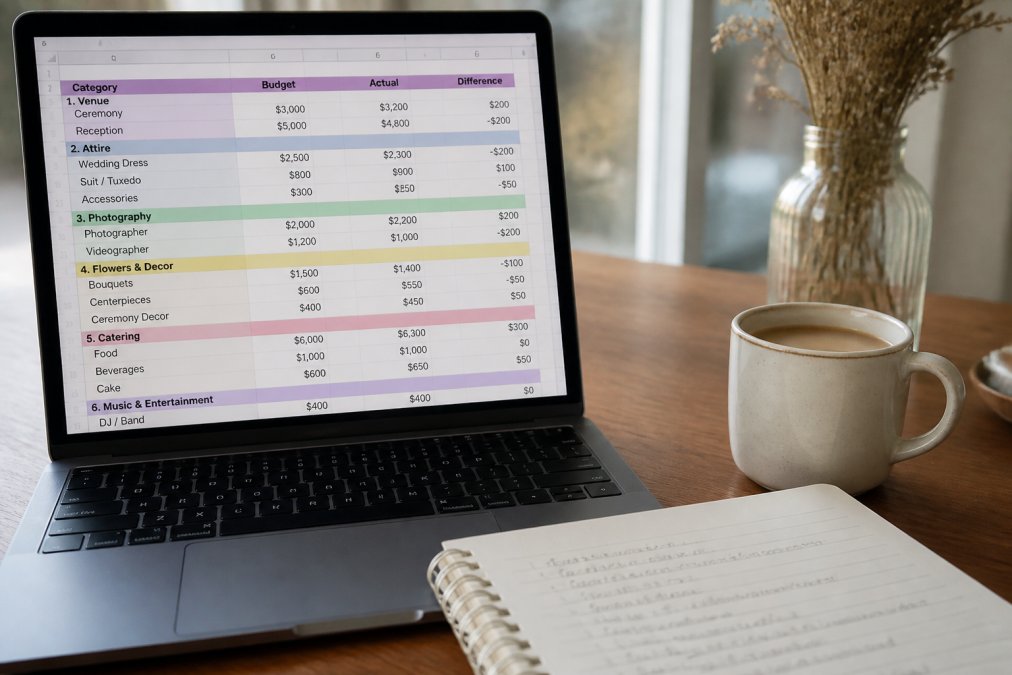
The failure mode is always the same: couples track the big vendors, forget the small ones, and discover the gap three weeks out. The categories that most often blow a budget are the ones nobody itemizes:
- Service charges and gratuities. Many caterers and venues add a service charge that is not a tip, plus an expected gratuity on top. Budget both lines separately.
- Attire alterations. Alterations frequently run a meaningful fraction of the dress or suit price and are rarely quoted at purchase.
- Transportation. Shuttles, rideshare for the bridal party, and vendor parking add up across a full day.
- Welcome bags and out-of-town guest costs. Per-room or per-bag costs multiply fast once your guest list is final.
- Postage and stationery. Save-the-dates, invitations, RSVP cards, and thank-you notes each carry their own postage and printing line.
- Marriage license and officiant fees. Small, fixed, and almost always forgotten.
- Contingency. A 5-10% buffer is the standard recommendation from most planners. Without it, the first surprise invoice becomes a credit card balance.
The most common mistake is treating the budget as static. Every guest count change ripples through catering, rentals, favors, and seating. A tracker connected to your guest list catches those ripples automatically; a standalone spreadsheet does not.
The Security Question Most Budget Guides Skip
A budget tracker holds more sensitive data than most couples realize: vendor contracts, deposit amounts, payment details, and the names and addresses tied to every line item. Where that file lives matters.
- Cloud-hosted subscription apps store your financial data on a company's servers. That is convenient, but it means your data outlives your subscription and depends on that company's security posture indefinitely.
- Local files, a downloaded spreadsheet or a browser-based planner that stores data on your own device, keep the data under your control. The trade-off is that you are responsible for backups.
- Shared spreadsheets in a free cloud service are the riskiest default. Anyone with the link can often view or edit, and version history may retain deleted financial details longer than you expect.
Federal Trade Commission guidance on protecting personal information is worth reading before you hand any platform your full guest list, addresses, and payment details. The same principles apply to your budget file.
Integration: Where Your Budget Should Live
A budget tracker that lives alone is one you will forget to update. The practical question is whether it connects to the tools you already use:
- Calendar. Payment due dates and deposit deadlines should appear alongside your other commitments. Look for iCal export or native Google Calendar and Outlook sync.
- Guest list. Headcount drives catering, rentals, and favors. If your budget cannot pull the current guest count, you will recalculate by hand every time an RSVP arrives.
- Vendor contacts. A deposit is only useful next to the vendor's name, contract terms, and payment schedule.
- Banking or expense apps. Some couples export transactions to reconcile against the budget monthly. A CSV export is usually enough.
If your tracker cannot talk to at least your guest list and your calendar, you are maintaining two systems and reconciling them by hand, exactly the problem a digital organizer is supposed to solve.
Your Digital Wedding Planning Checklist: From 'Yes' to 'I Do'
A digital wedding planning checklist works only when it is tied to dates, owners, and the other sections of your planner. A list of tasks with no deadlines is a wish list; one that does not talk to your guest list, budget, or vendor contacts is a second job.
The structure that holds up under pressure moves in four phases:
- Foundation (months 12-9 out): Set the total budget, draft the guest list, book venue and date.
- Core vendors (months 9-6 out): Photography, catering, attire, entertainment, officiant.
- Details (months 6-3 out): Invitations, registry, transportation, hotel blocks, cake.
- Final stretch (months 3-0): RSVP tracking, seating chart, vendor confirmations, day-of timeline.
Milestone tracking beats daily task lists because weddings are deadline-driven, not effort-driven. You do not need to do something every day; you need to hit specific dates without missing them.
What Makes a Digital Checklist Different From a Printable One
A printable checklist is a static PDF.
The Post-Wedding Checklist Nobody Builds
Wedding Guest List Management Tools That Actually Work
Data Privacy, Offline Access, and Post-Wedding Utility
Frequently Asked Questions
Which digital wedding organizer is best for 2026?
The best digital wedding organizer for 2026 depends on your needs. For couples who want an all-in-one, offline-compatible solution without subscriptions, Ever After Suite offers 16 connected sections for guest lists, budgets, and seating charts in a single download. If you prefer a free, cloud-based option, tools like Zola or The Knot work well but may lack advanced customization. Consider your priority: comprehensive organization versus app-based convenience.
Is it better to use a dedicated wedding app or a customizable digital planner?
A dedicated wedding app like The Knot or WeddingWire provides convenience and mobile access but often locks your data into their ecosystem. A customizable digital planner, such as Ever After Suite, gives you full control, works offline, and lets you organize everything in one file without recurring fees. For couples who value privacy and long-term access, a downloadable planner is often the better choice.
How do digital wedding organizers help with budget management?
Digital wedding organizers typically include a wedding budget tracker spreadsheet that lets you allocate funds by category, track expenses in real time, and compare estimated versus actual costs. Features like automatic totals and visual dashboards help you spot overspending early. Ever After Suite connects your budget to your guest list and vendor contacts, so every change updates across sections, reducing manual errors.
Are digital wedding planners compatible with mobile devices?
Most digital wedding planners are compatible with mobile devices. Cloud-based apps like Zola offer dedicated iOS and Android apps. Downloadable planners such as Ever After Suite work in any modern mobile browser (Safari, Chrome) and store data locally on your device, so you can access your guest list or seating chart on the go without an internet connection. Always check the file format before purchasing.